Free Image to Visio Converter
Turn any diagram image (PNG, JPG, screenshot) into a fully editable Visio (VSDX) file — every shape, connector, and label becomes a real, editable object.
Drop a diagram image here, click to browse, or paste from clipboard
No sign-in needed — the preview is free. Downloads use 10 credits.
Real conversion example
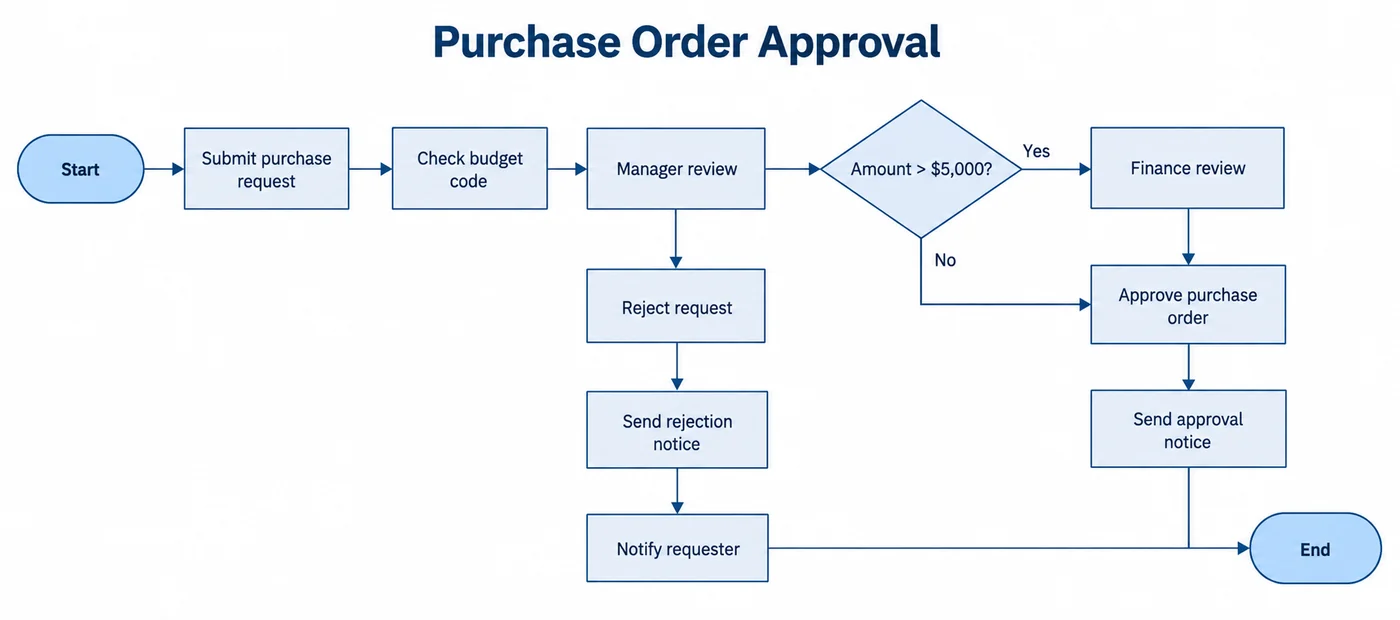
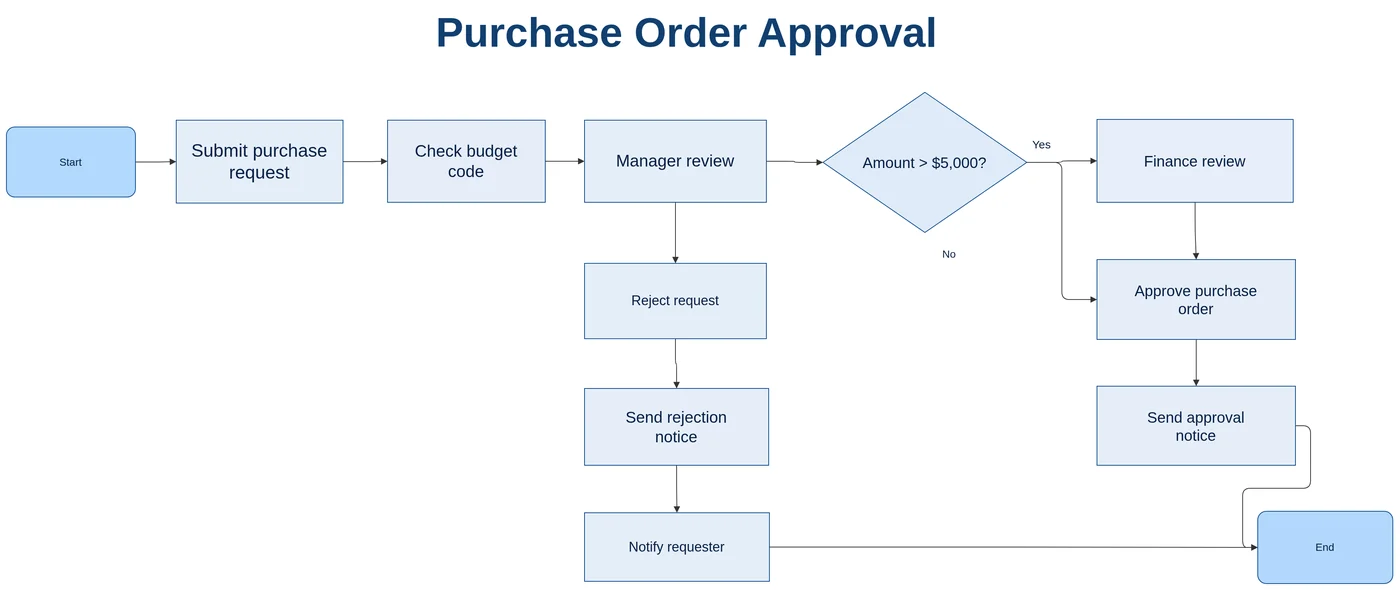
A purchase order approval flowchart screenshot, converted in 19 seconds: all 12 steps as shapes, glued connectors, and the Yes/No decision labels as editable text.
A hard case: low-res Chinese flowchart (what worked, what didn’t)
In this sample, the structure (nodes and connectors) is ready to use; connector labels and small text need checking.
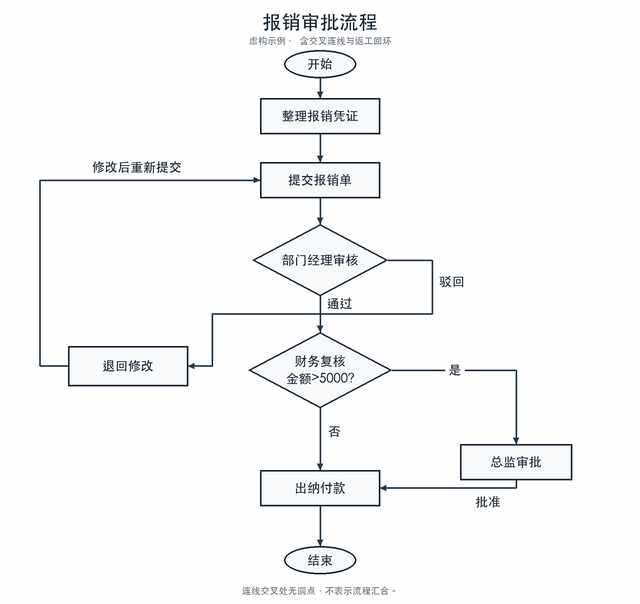
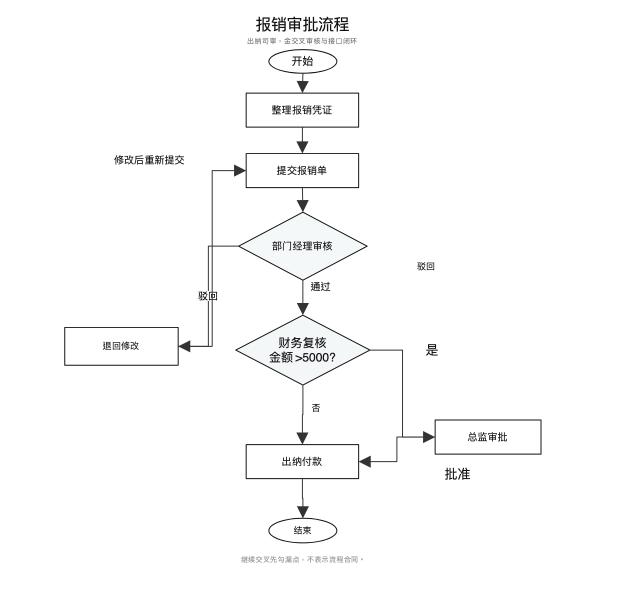
Tested on 2026-10-21; sample size: 1. A self-made fictional expense approval flowchart was reduced from 1600 × 1510 to a 640 × 604 JPEG at quality 45. One conversion took 24 seconds using the LayerBack engine, run locally with the same pipeline as the live service. The output image is a LibreOffice rendering of the resulting .vsdx, without manual corrections.
| Item | Result |
|---|---|
| Node text and shapes | 9/9 correct, including “金额>5000?”; ovals, rectangles, and both decision diamonds matched. |
| Connector endpoints | 10/10 correct, including the “退回修改 → 提交报销单” rework loop. Connectors are glued to the shapes. |
| Connector labels | Only “驳回” became a connector label. “通过”, “是”, “否”, “批准”, and “修改后重新提交” became correctly positioned standalone text boxes; they are not bound to connectors and will not follow when shapes move. An extra duplicate “驳回” text box needs deleting. |
| Connector routing | The “驳回” connector exits the left side of the diamond along a different route. The original crossing disappeared, but part of this connector overlaps the rework loop and needs adjusting. |
| Small text | The title is correct. The subtitle “虚构示例 · 含交叉连线与返工回环” and bottom note were misread at low resolution; for example, the subtitle became “出纳司审,金交叉审核与接口闭环”. |
| Manual corrections needed | Move or bind 5 labels to their connectors, delete 1 duplicate text box, adjust 1 overlapping connector route, and correct 2 lines of small text. The main structure does not need redrawing. |
What needs manual correction
- Move or bind the 5 standalone labels to their corresponding connectors.
- Delete the duplicate “驳回” text box.
- Adjust the “驳回” route where it overlaps the rework loop.
- Correct the subtitle and bottom note.
Recommendations for your image
- Use the original image or a higher-resolution screenshot when possible.
- Text smaller than 12 px is easy to misread in low-resolution images. Check small text and connector labels first after conversion.
What “editable” means in Visio
A diagram image is flat pixels: Visio can show it, but you cannot click a box, fix a typo, or drag a step to a new place. LayerBack reads the picture and draws it again the way you would in Visio — each box becomes a Visio shape, each arrow a connector glued to the shapes at both ends, and each label real text inside its shape.
That is why the result behaves like a diagram you built yourself: move a shape and its connectors re-route, or double-click a label to retype it.
Check the result in Visio in one minute
Before you rely on any converter, open the downloaded VSDX and run these checks:
- Click a single box: it should select on its own, not the whole picture.
- Drag that box: the arrows attached to it should follow and stay connected.
- Double-click a label and type: the text should change like normal Visio text.
Screenshots, PNG exports, and JPG photos
Crisp screenshots and PNG exports give the best results because edges and text are sharp. JPG works too; heavy compression only matters when labels are small. For a photo of a printed page or a slide, crop to the diagram and keep the camera square to the page so boxes stay rectangular.
If the diagram lives in a PDF, upload the PDF itself and pick the page — it is rendered at high resolution instead of relying on a low-resolution screenshot.
Ways to get an image into Visio
| Method | What you get | Editable diagram? |
|---|---|---|
| Online “image to VSDX” file converters | Wrap the picture in a .vsdx container. It opens in Visio, but the whole diagram is one image. | No |
| Vector tracing (PNG to SVG, then import) | Produces hundreds of loose outline paths. Text becomes shapes you cannot type into, and arrows are not attached to anything. | Partly |
| Redrawing by hand | Fully editable, but a 20-box flowchart takes 30–60 minutes to redraw and align. | Yes |
| LayerBack | Recognizes each box, connector, and label and rebuilds them as native objects, in about 30–60 seconds. | Yes |
When results are weaker
- Very small or blurry text (under about 8 px tall in the image) may be misread — check labels before sharing.
- Dense diagrams with many crossing lines can need a few connectors re-attached.
- Photos of people, products, or scenes are not diagrams; they are kept as an embedded image.
- Icons and logos are kept as small images inside the diagram rather than redrawn as Visio stencils.
Every conversion shows a free preview first, so you can check the result before paying.
How it works
Upload your source
Choose a PNG, JPG, WebP, or PDF page. Screenshots and photos work too.
AI rebuilds the diagram
LayerBack recognizes every shape, connector, and label, then recreates them as real objects.
Download or edit online
Get Visio, PowerPoint, draw.io, and SVG together, or make final adjustments in the built-in editor.
Frequently asked questions
Is it actually possible to get editable Visio shapes from an image?
Yes. Generic "PNG to VSDX" converters only embed your picture inside a Visio file, which is why the result is not editable. LayerBack rebuilds every shape, connector, and label as a native Visio object instead of embedding the image — so the VSDX you download behaves like a diagram drawn in Visio.
Can I convert a JPG or PNG flowchart to an editable Visio diagram?
Yes. Upload the JPG, PNG, or WebP image (or a PDF page) and LayerBack rebuilds the flowchart or diagram as a Visio (VSDX) file: boxes become native shapes, arrows become connectors glued to those shapes, and labels become editable text. Check the free preview before you download.
Which Visio versions can open the file?
The download is a standard .vsdx file, the format used by Visio 2013 and later, Visio in Microsoft 365, and Visio for the web. You can also open it in the free LayerBack VSDX viewer.
Do I need Visio to check the result?
No. The free preview shows the converted diagram before you pay anything, and the free VSDX viewer opens the downloaded file without Visio.
Is it free?
Converting and previewing are free and need no account. The first download or edit of a diagram asks you to sign in and uses 10 credits, which unlocks every format and edit of that diagram. Failed conversions never cost anything.
What files can I upload?
PNG, JPEG, and WebP images up to 20 MB, or a PDF — pick the page with the diagram and it is rendered in your browser before upload. Uploads are deleted within 72 hours.