Free PNG to Visio Converter
Turn a PNG flowchart or diagram into a fully editable Visio (VSDX) file — every shape, connector, and label becomes a real, editable object.
Drop a diagram image here, click to browse, or paste from clipboard
No sign-in needed — the preview is free. Downloads use 10 credits.
Real conversion example
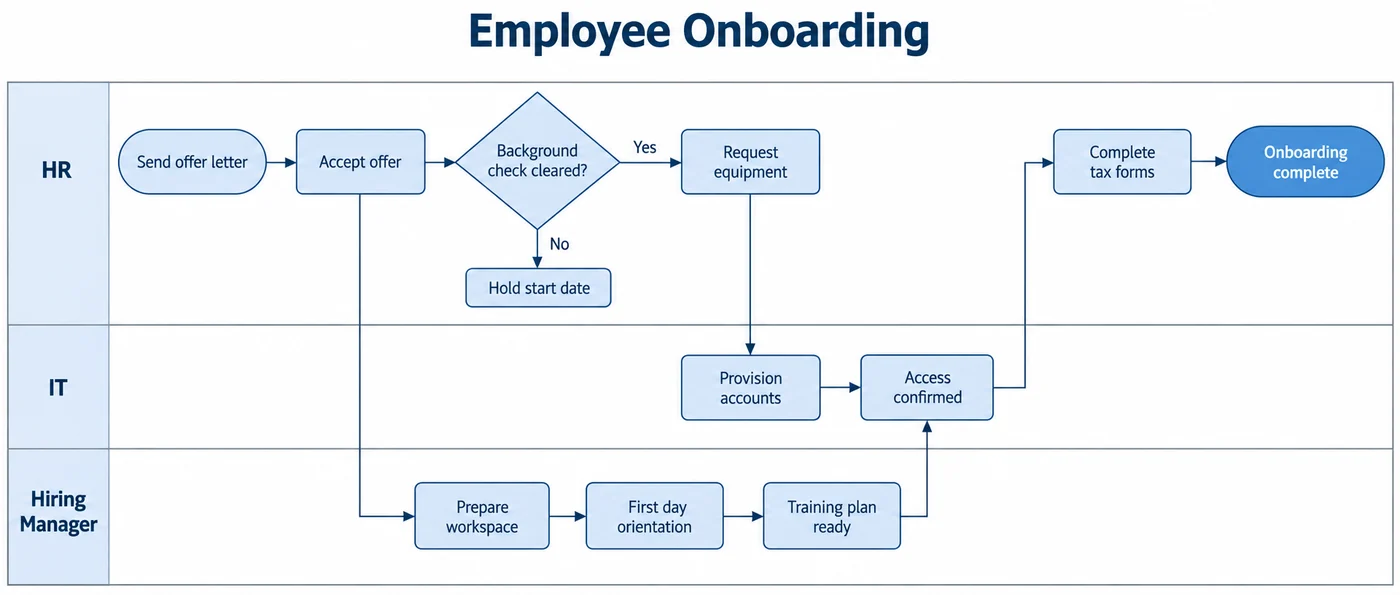
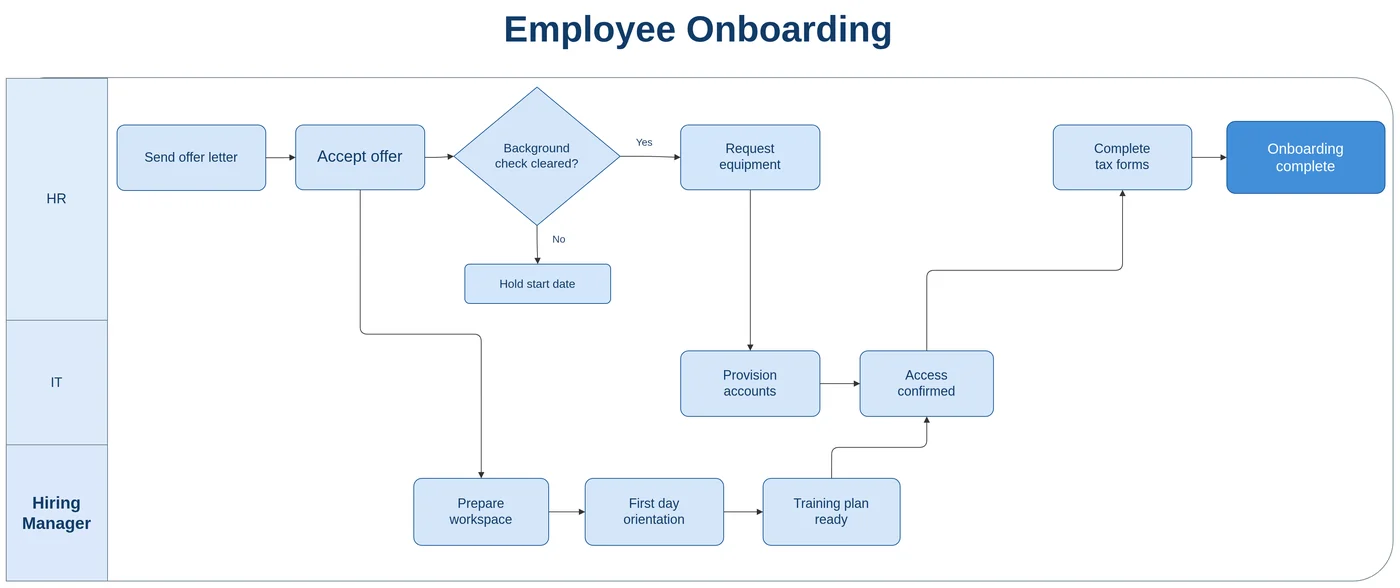
A cross-functional onboarding PNG with three lanes. The lanes come back as containers and every step as its own shape, connected across lanes.
Why a PNG in Visio is not a Visio diagram
Insert a PNG into Visio (Insert → Pictures) and you get one picture object. The same happens with most “PNG to VSDX” converters: they save a .vsdx file that contains your PNG. The file type changes; the diagram stays locked in pixels.
LayerBack does the part those tools skip. It finds the shapes, the connectors between them, and the text, and writes them into the VSDX as Visio objects, so the file is a diagram rather than a picture of one.
Getting the best PNG
If you still have access to the tool that made the PNG, export it again at 2× scale or higher. Transparent backgrounds are fine. Cropping away page margins, legends you do not need, and watermarks helps the recognition focus on the diagram.
- Export or screenshot at 100% zoom or more, so labels are sharp.
- Keep the whole diagram in one image — do not stitch several screenshots.
- Swimlanes, containers, and grouped areas are recognized as containers around their shapes.
Swimlane and cross-functional diagrams
Process diagrams with lanes for teams or systems are one of the most common PNGs people need back in Visio. Lanes come back as labeled containers and the steps inside them as separate shapes, so you can add a step to a lane or move a step between lanes and keep the flow connected.
PNG to VSDX: what each approach gives you
| Method | What you get | Editable diagram? |
|---|---|---|
| Insert → Pictures in Visio | One picture object. Nothing inside it can be selected. | No |
| Online “image to VSDX” file converters | Wrap the picture in a .vsdx container. It opens in Visio, but the whole diagram is one image. | No |
| Vector tracing (PNG to SVG, then import) | Produces hundreds of loose outline paths. Text becomes shapes you cannot type into, and arrows are not attached to anything. | Partly |
| LayerBack | Recognizes each box, connector, and label and rebuilds them as native objects, in about 30–60 seconds. | Yes |
Know before you convert
- Low-resolution PNGs (for example thumbnails copied from a web page) lose small text.
- Gradients, shadows, and 3D effects are simplified to flat fills.
- Custom icons stay as images inside the diagram.
Every conversion shows a free preview first, so you can check the result before paying.
How it works
Upload your source
Choose a PNG, JPG, WebP, or PDF page. Screenshots and photos work too.
AI rebuilds the diagram
LayerBack recognizes every shape, connector, and label, then recreates them as real objects.
Download or edit online
Get Visio, PowerPoint, draw.io, and SVG together, or make final adjustments in the built-in editor.
Frequently asked questions
Is it actually possible to get editable Visio shapes from an image?
Yes. Generic "PNG to VSDX" converters only embed your picture inside a Visio file, which is why the result is not editable. LayerBack rebuilds every shape, connector, and label as a native Visio object instead of embedding the image — so the VSDX you download behaves like a diagram drawn in Visio.
Can I convert a PNG to VSD instead of VSDX?
LayerBack writes VSDX, the format Visio has used since 2013. If you need the older .vsd format, open the VSDX in Visio and use File → Save As → Visio 2003–2010 Drawing.
Will the colors match my PNG?
Fill, line, and text colors are taken from the image, so the rebuilt diagram looks like the original. You can change any of them afterwards like any other Visio formatting.
Is it free?
Converting and previewing are free and need no account. The first download or edit of a diagram asks you to sign in and uses 10 credits, which unlocks every format and edit of that diagram. Failed conversions never cost anything.
What files can I upload?
PNG, JPEG, and WebP images up to 20 MB, or a PDF — pick the page with the diagram and it is rendered in your browser before upload. Uploads are deleted within 72 hours.