PDF 转 Visio 在线工具
无需先截图。上传 PDF、选中图表页面,即可生成图形与连线都能编辑的 Visio(VSDX)文件。
把图表图片拖到这里,点击选择,或直接粘贴
无需登录,预览免费;下载文件需 10 积分
真实转换示例
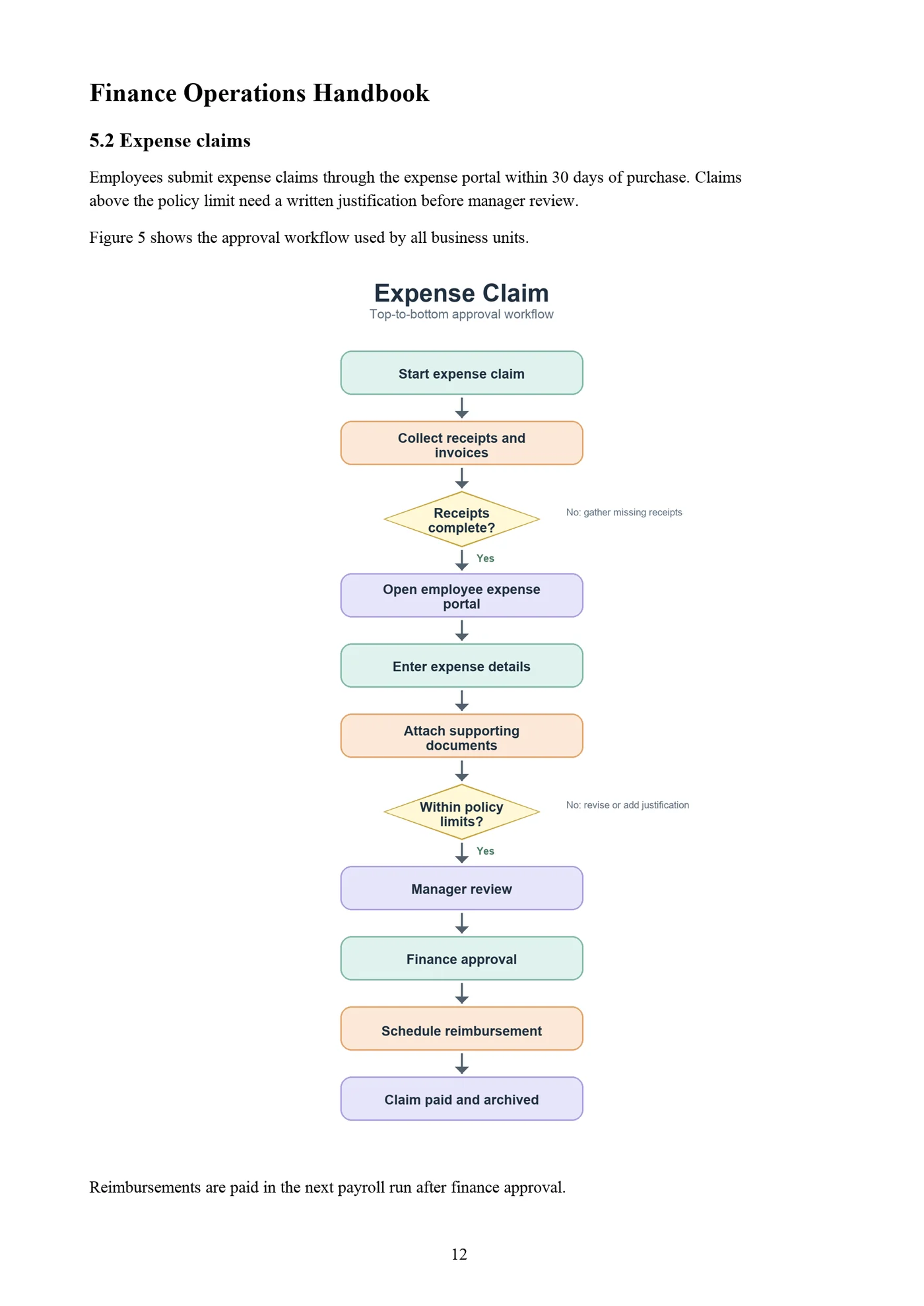
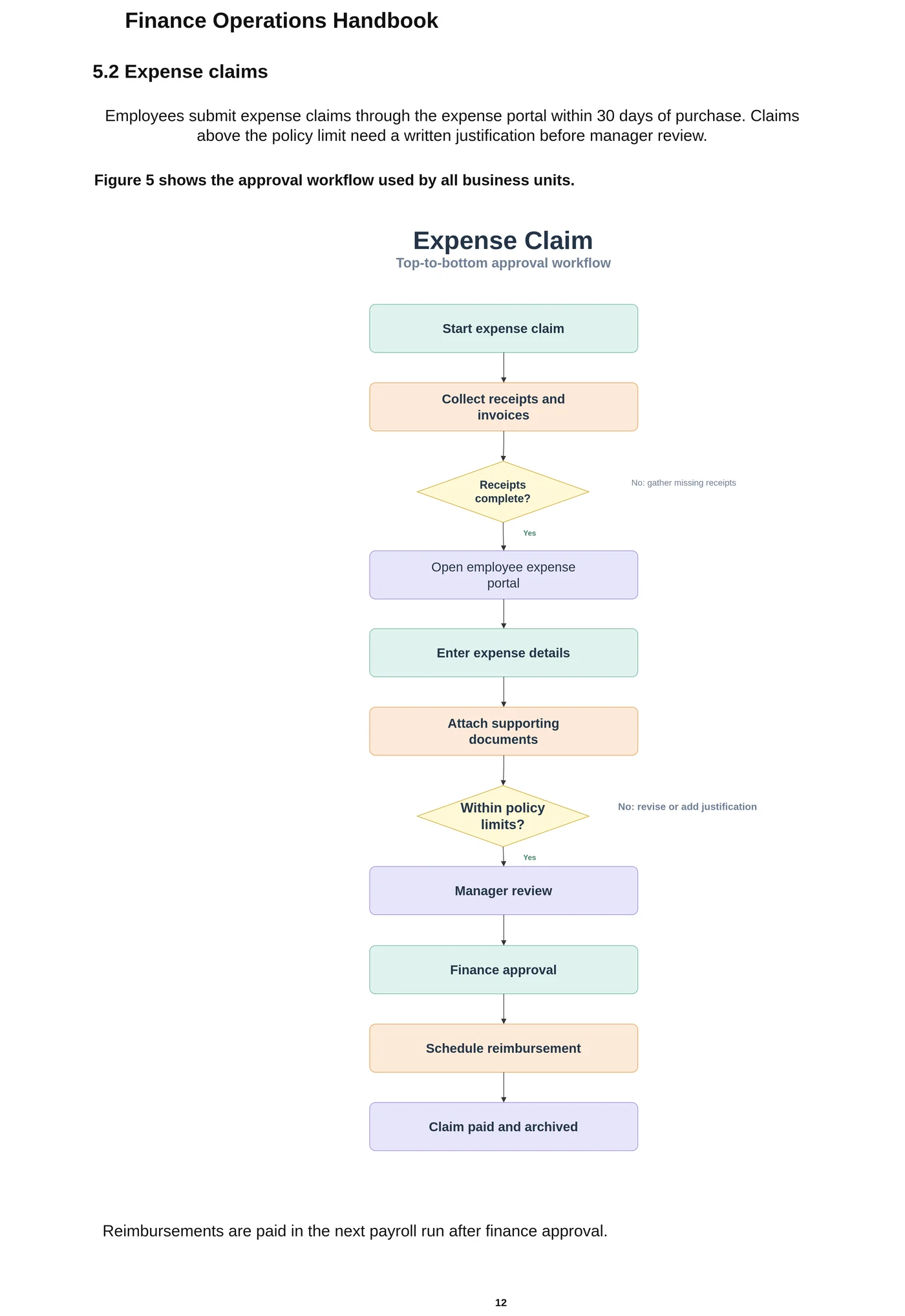
财务手册 PDF 的第 12 页。报销审批流程(12 个步骤、2 个判断)重建为 Visio 形状和粘连的连接线,标题和正文变成可编辑文本。
为什么 Visio 不能直接打开 PDF
Visio 没有 PDF 导入功能。你可以把 PDF 页面作为嵌入对象或图片放进绘图,但里面的图仍是一整块。很多人搜索“PDF 转 Visio”,正是因为 PDF 是某张多年前画的图唯一留下来的版本。
怎样把 PDF 图表转成 Visio
在本页上传 PDF。多页文件会出现页面选择器,点击图表所在的那一页。这一页会在你的浏览器里按高分辨率渲染,只上传这一页的图片,文档其余内容不会离开你的电脑。
随后 LayerBack 把图表重建为 Visio 形状、粘连的连接线和文字,你可以下载 VSDX(同一次转换还包含 PowerPoint、draw.io 和 SVG)。
矢量 PDF 与扫描 PDF
从 Visio、PowerPoint 或绘图软件导出的 PDF 是矢量 PDF,线条和文字放大后依然清晰,效果最好。扫描 PDF 本质是一张页面照片,只要放大后文字清楚也能转换。如果扫描时页面是横着的,请先旋转正过来。
把 PDF 图表放进 Visio 的几种方式
| 方式 | 得到的结果 | 图表可编辑? |
|---|---|---|
| 在 Visio 中把 PDF 页面插入为对象或图片 | 页面显示在绘图里,但图表无法编辑。 | 否 |
| 在线“PDF 转 VSDX”文件转换站 | 文件类型变了,但页面通常以一张图片装在 VSDX 里。 | 否 |
| Visio 的矢量 PDF 导入插件 | 能把矢量 PDF 的线条和文字拆成很多零散部件,但方框和箭头不会重建为相互连接的图形;不支持扫描 PDF。 | 部分 |
| LayerBack | 把所选页面上的图表重建为 Visio 形状、粘连的连接线和文字,矢量 PDF 和扫描 PDF 都支持。 | 是 |
转换前请了解
- 每次转换一页,多个图表页请分别转换。
- 包含成千上万条细线的工程图(平面图、电路原理图)不在设计范围内。
- 带密码的 PDF 需要先解除保护再上传。
每次转换都会先给出免费预览,付费前就能检查结果。
使用步骤
上传源文件
选择 PNG、JPG、WebP 或 PDF 页面,截图和照片也可以直接使用。
AI 重新搭建图表
LayerBack 识别每个图形、标签和连接关系,并将它们重建为真正的对象。
下载或在线编辑
一次获得 Visio、PowerPoint、draw.io 和 SVG,也可先在内置编辑器中调整。
常见问题
图片真的能转换成可编辑的 Visio 图形吗?
可以。普通的 PNG 转 VSDX 工具只是把图片塞进 Visio 文件,所以内容无法编辑。LayerBack 会识别并重建每个图形、标签和连接关系,下载的 VSDX 与在 Visio 中手工绘制的图一样可以修改。
文字还能编辑吗?
可以。文字会被识别,并作为形状里的真实文本写入 VSDX,而不是轮廓或图片。
PDF 有很多页,能只选一页吗?
可以。上传后会出现带缩略图的页面选择器,点击图表所在页面即可。
整个 PDF 会被上传吗?
不会。PDF 在浏览器中打开,只有你选中的那一页会渲染成图片并上传转换。
收费吗?
转换和预览免费,不需要登录。第一次下载或编辑一张图时需要登录并使用 10 积分,之后这张图的所有格式和编辑都免费。转换失败不扣积分。
支持上传哪些文件?
支持不超过 20 MB 的 PNG、JPEG、WebP 图片,也可以直接上传 PDF 并选择图表所在页面(页面在浏览器本地渲染后再上传)。上传文件 72 小时内自动删除。